Your CSV is too big for Excel.
Open it here.
Rowmill opens files with millions of rows right in your browser — filter them, pivot them, chart them. Nothing is uploaded.
No upload · No account · No install · Free
No file handy?
What about my file?
Filtering and pivoting, measured — not estimated. These are the largest files we've tried, not the limit:
- at 50 columns
- at least 10,000,000 rows
- at 122 columns
- at least 5,000,000 rows
- at 200 columns
- at least 2,500,000 rows
How it works
Three steps, no syntax
Step 1
Drop the file
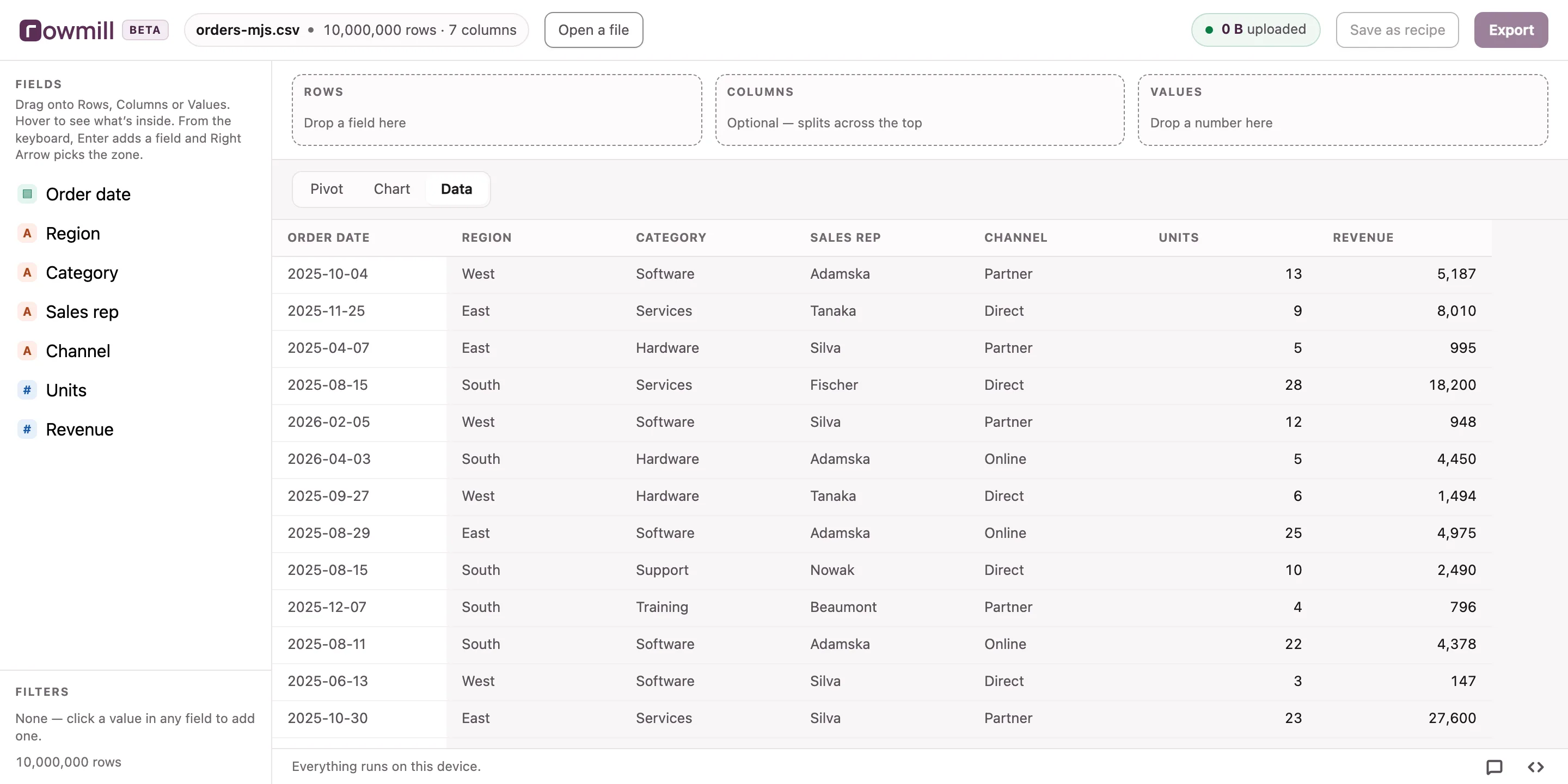
Rowmill reorganises it on your own device so later questions are instant, then shows you every column — types, blanks, distinct values, distribution. One pass, and you finally know what's in the export.
Step 2
Drag to explore
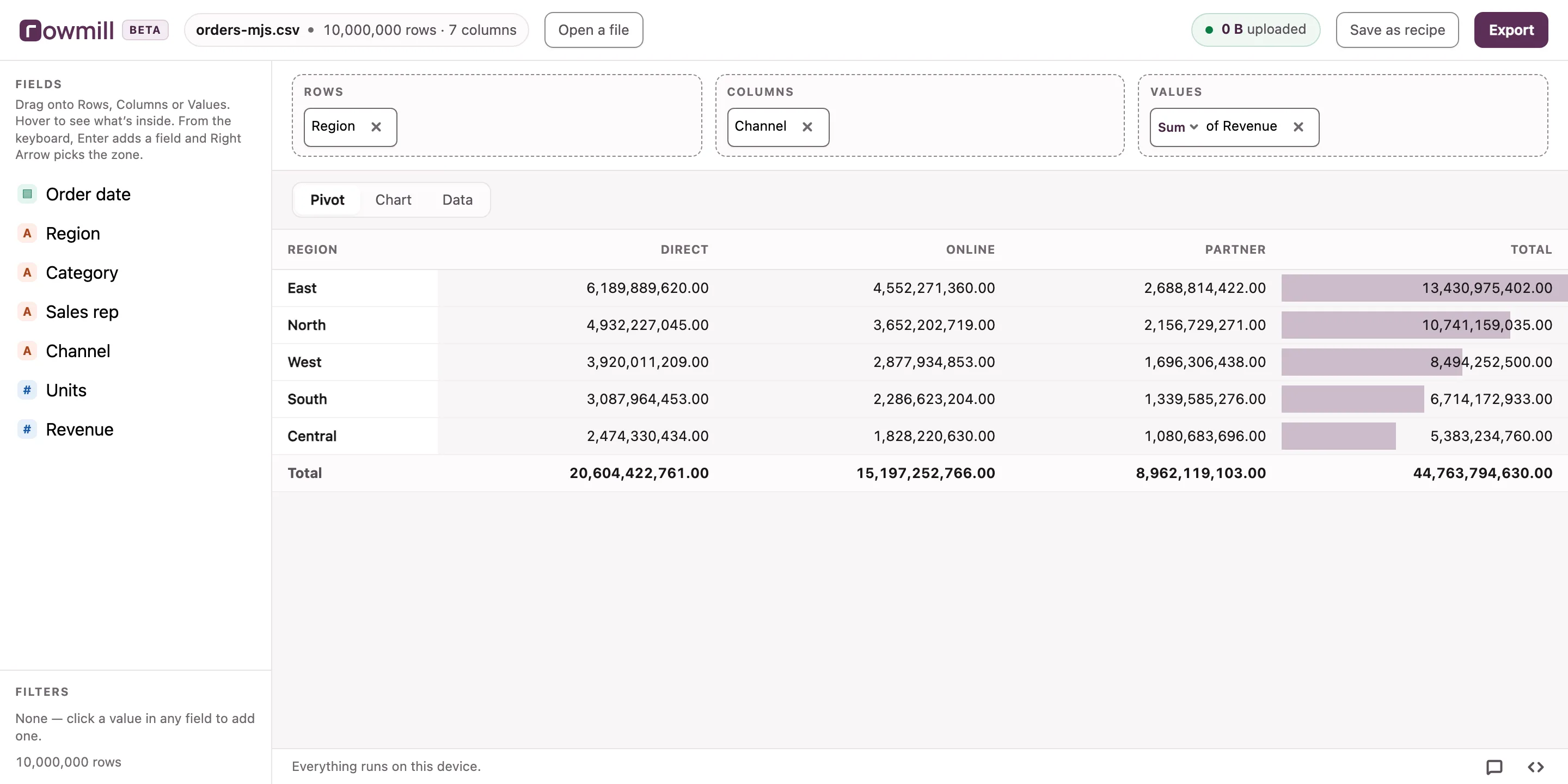
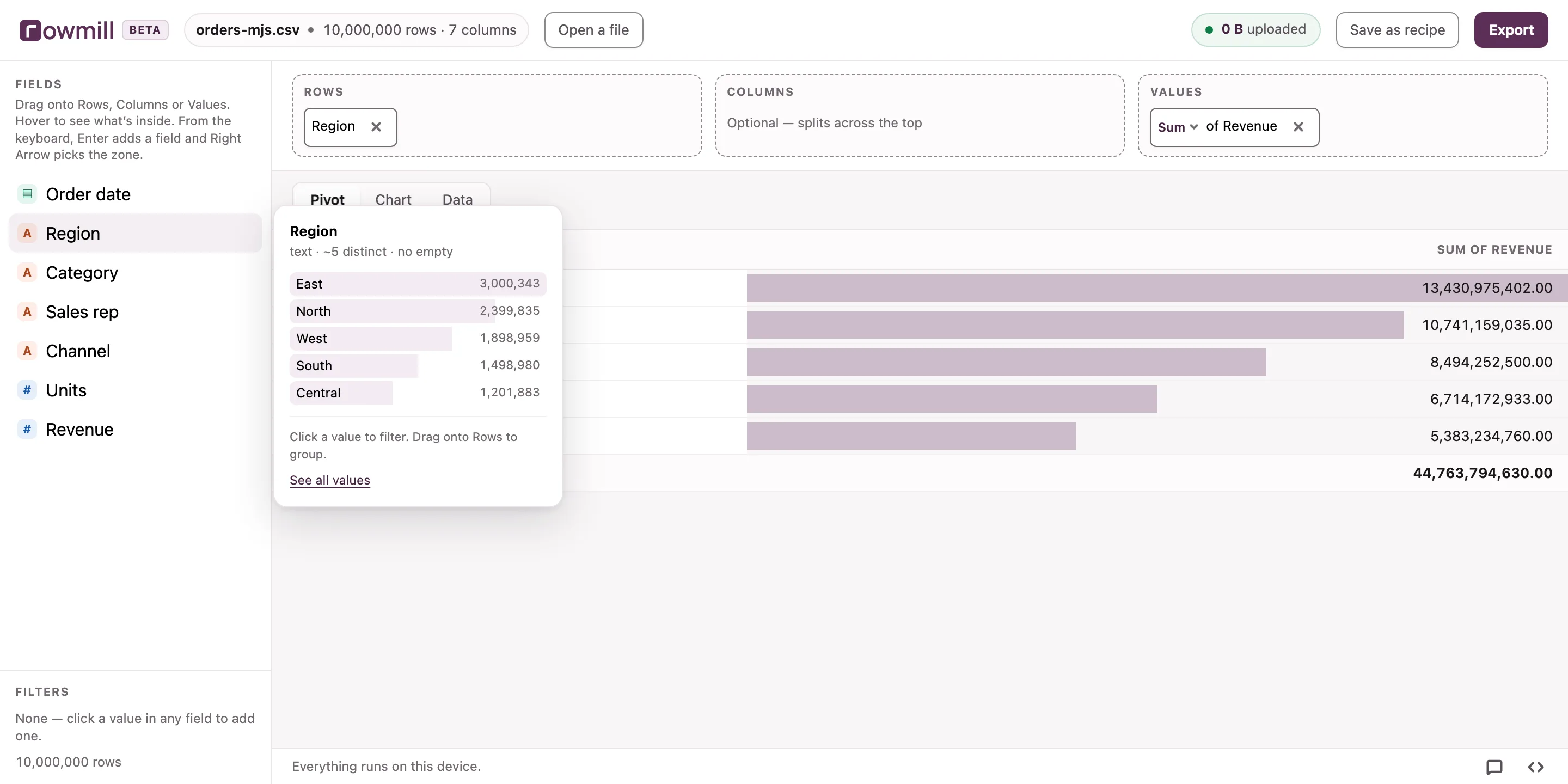
Drag fields onto Rows, Columns and Values. Click a value to filter. Group, total, average, chart. Exactly the pivot table you know, on a file Excel refuses to open.
Step 3
Take the answer
Export the result to CSV or Excel and get on with your day. Or keep the tab open and carry on where you left off.
This is the screen at the top of the page — 10,000,000 rows, answered.
Privacy
Your file stays yours
The file is read by a database engine running inside this browser tab. There's no server on the other end to send it to.
Read the privacy pageOf your file, sent anywhere
0 B
Rowmill counts every byte it sends.
Runs in this tab
Nothing to install, nothing running anywhere else.
Counted, not promised
The byte counter is in the app too — watch it while you work.
Works with Wi-Fi off
Once your file is open, everything keeps working.
Why not the usual options
Every other route makes you give something up
Usually it's your data, your afternoon, or both.
Excel
Online converters
Cloud spreadsheets
Rowmill
Being straight with you
What Rowmill can't do
A tool that only lists its strengths is hiding something. Here's where the edges are.
- A single question can use about 3GB of memory. That's a browser limit, not a choice. Filtering, grouping and pivoting stay far under it — but sorting a very long or very wide file can take minutes, or not finish at all. Rowmill tells you when a question needs more memory than the tab has.
- Very large CSVs take a minute or two to prepare. We convert the file once so every question afterwards is instant. You'll see a progress bar with real numbers, not a spinner.
- Safari clears stored files after 7 days of not visiting. That's Apple's rule, not ours. Your file is still on your disk — drop it again.
- Building a pivot needs a window at least 900px wide. Below that you can still read and scroll your results. Rowmill is in beta, and what it does on a phone isn't settled yet.
- No database connections. Rowmill works on files. If your data lives in Postgres, this isn't the tool.
Do this every month?
Save your filters, pivot and chart as a recipe. Next month, drop the new export and get the finished view back in one click. We're building it now.
Your address goes to our mailing list and nowhere else. Your file stays on this device.
One email when it ships. Nothing else, ever.
Questions
The things people ask first
How many rows can Excel actually open?
Excel's grid is 1,048,576 rows by 16,384 columns — a limit of the file format, not of your machine. Open a 2-million-row export and Excel loads the first 1,048,576 and warns you: "This data set is too large for the Excel grid. If you save this workbook, you'll lose data that wasn't loaded." That's how people end up reporting numbers from a partial file.
On Windows you can load it off-grid into Power Pivot instead. On a Mac there's no Data Model at all, so the limit is absolute. Excel also becomes slow well before the limit — a 400MB CSV with 40 columns will often make it crawl.
Why not just use Power Query?
Power Query is good, and if it already works for you, keep using it. Three things stop it being the answer for everyone. It's Windows-only for the part that matters — Power Pivot has never shipped on a Mac, so there's no Data Model there at all. It needs a licensed Excel and a file that opens, which is no help when Excel locks up on the file you're trying to read. And it's a transform pipeline you have to learn before it does anything.
Rowmill is the other trade. Drop the file, drag three fields, and the pivot answers in about a second at ten million rows. Nothing to install, nothing to learn first, and it works the same on a Mac.
Is it safe to upload a CSV to an online converter?
Usually not, if the file contains anything about real people. Most free converters upload your file to a server you know nothing about, in a country you didn't choose, with a retention policy you haven't read. If the file has customer emails, salaries or health data in it, that upload is a disclosure — and under GDPR it's yours to justify.
Rowmill never sends the file anywhere. The processing happens in your browser tab, on your machine. You can check it — Rowmill counts every byte it sends and shows the running total on this page, and your file's share of it stays at 0 B.
Two things do leave, and neither is your file: an email address, if you type one into the recipe waitlist, and a count of which features get used — coarse buckets like "1M–10M rows", never a column name, a file name, or a value from inside it.
How do I open a 2GB CSV file?
Drop it here. Rowmill converts it once on your device first, which means later questions only read the columns and rows they actually need instead of scanning the whole file every time. That conversion is why a file that defeats a spreadsheet becomes something you can pivot in about a second at ten million rows.
Do I need to know SQL?
No. Everything is drag and click — the same Rows, Columns and Values model you already use in an Excel pivot table. If you're curious, there's a "show me the SQL" link that reveals the query behind whatever you just built. Plenty of people have learned SQL that way. It's optional, and it's never in your face.
What does it cost?
Opening, exploring, pivoting, charting and exporting a file is free, forever, with no account. Nothing that's free today will start costing money. There may be paid features later for people who do this repeatedly or for someone else — that depends on whether enough people want them.
What file formats work?
CSV and TSV. If your export is something else, tell us — the list grows based on what people actually turn up with.